What a Threat Emulation is and how to read it
Last updated: October 19, 2026
A Threat Emulation is a controlled simulation of a real attack, designed to identify exploitable vulnerabilities under real conditions. Unlike a traditional scan, it does not stop at detecting potential flaws: it reproduces an attacker's behavior and validates whether the risk is actually exploitable.
A Threat Emulation groups one or more assets
A Threat Emulation groups one or more assets and tests them as a single unit. It can represent an application, a business flow, or the set of assets you need to test together. That is why it is best to name it after what it means for your business, for example "Home banking" or "Payment flow".
Each Threat Emulation has its own scope, configuration, executions, and vulnerabilities.
In the Threat Emulation you define:
Scope: which assets it includes and how many paths to test on each one.
Testing type: Full security, Focused, or Change-based.
Configuration: depth, recurrence, Human hacking, restrictions, and additional information.
For the step-by-step guide, see How to create a Threat Emulation.
Threat Emulation and executions
Every time a Threat Emulation runs, an execution is generated. If the Threat Emulation is recurring, it will have one execution for each configured period (monthly, quarterly, or semiannual). Each execution consumes credits from your plan.
In addition to scheduled executions, you can launch an on-demand execution with Run now:
Full security: a complete execution across all the assets in the Threat Emulation.
Focused: an execution test focused on a target you define.
Re-execute last run: repeats the last execution.
On-demand executions do not affect scheduled executions and use the restrictions and credentials from the Threat Emulation's configuration.
For more detail on consumption, see Credits: what they are and how they are consumed.
Threat Emulation details
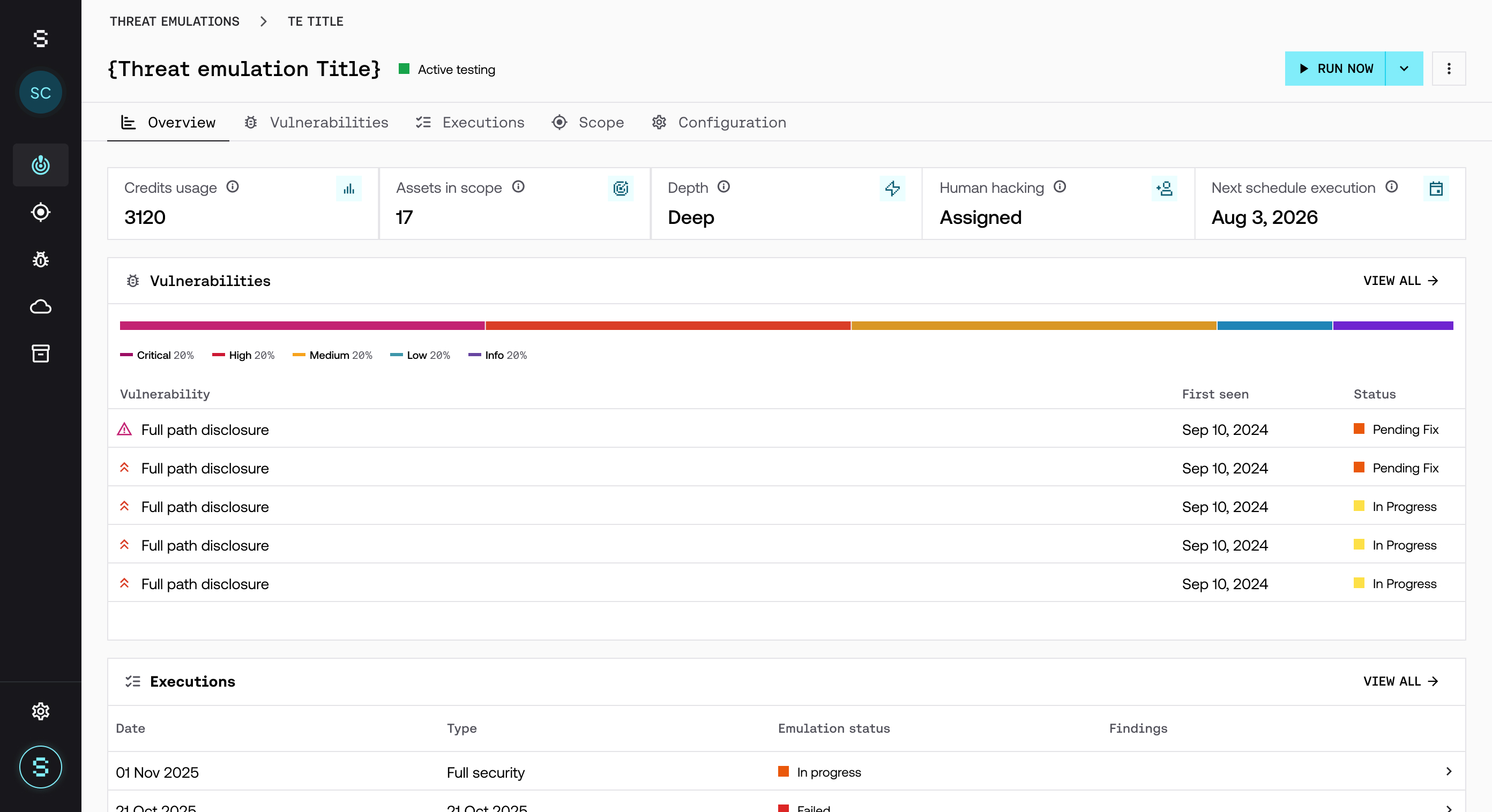
When you open a Threat Emulation, you will find these tabs:
Overview: a summary with the credits consumed, the number of assets in scope, the depth, whether it has Human hacking, and the date of the next execution. It also shows the latest vulnerabilities and executions.
Vulnerabilities: all the vulnerabilities found by this Threat Emulation, with filters by asset, status, and severity.
Executions: the execution history, with its type, status, and vulnerabilities found.
Scope: the included assets, with the path limit for each one. From View detail you can see the information and access details of each asset. Assets that were tested but later removed from the scope appear at the end of the list, marked as Removed.
Configuration: the current configuration: recurrence, depth, Human hacking, network access (VPN), and restrictions.
What happens during an execution
When a Threat Emulation runs:
The context of the assets in scope is analyzed.
Possible attack paths are identified.
Tests are executed sequentially or in parallel.
Findings are validated before they are reported.
This entire process is automated, but it follows an offensive logic similar to that of a pentester.
Real-time visualization
The platform lets you watch how an execution progresses in real time:
Which actions are being executed.
On which endpoints or functionalities.
Which decisions Strike's AI agent is making.
How the testing evolves.
This lets you understand not only the result, but also the process behind each finding.
Execution trace
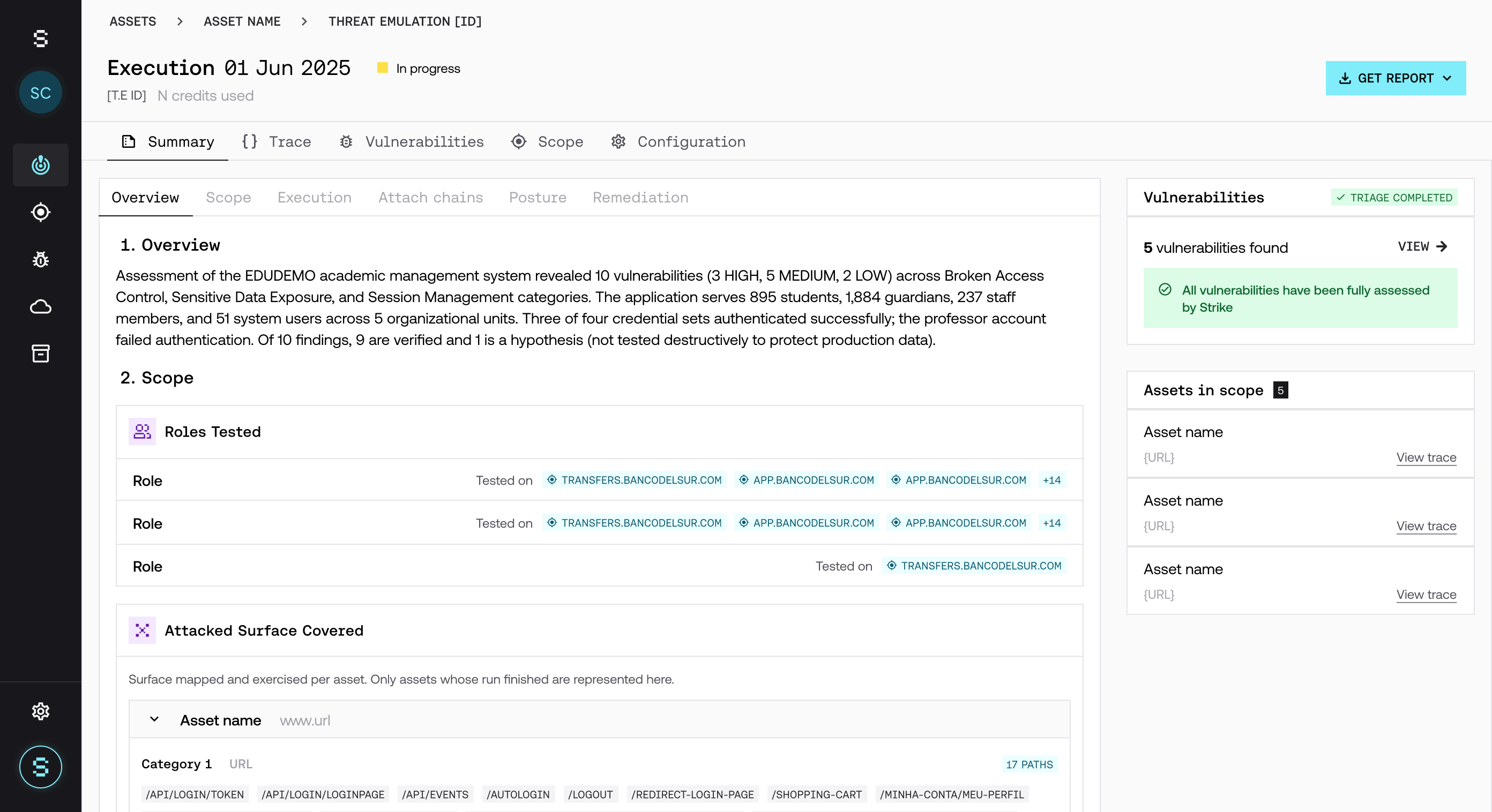
Each execution generates a trace with step-by-step detail: the sequence of actions, the agent's decisions, the tests executed, and the intermediate results. The trace lets you reconstruct the path that was followed to find a vulnerability.
Why it is different from a scan
Unlike traditional tools, a Threat Emulation:
Does not run tests indiscriminately.
Does not generate unnecessary noise.
Prioritizes the paths with the highest likelihood of exploitation.
Adapts its behavior to the context.
This makes it possible to find more relevant vulnerabilities and reduce false positives.
Relationship with vulnerabilities
Reported vulnerabilities are the result of executions. Each finding was executed, validated, and confirmed as exploitable, so the results are actionable.
Relationship with assets
Within a single asset, the agent builds context over time:
It correlates findings across different executions.
It adjusts its strategies based on previous results.
It prioritizes the attack paths with the highest likelihood of success.
This learning is specific to each asset and is not shared between different assets.
Best practices
Review the trace to understand the context of each finding.
Use real-time visualization to follow the progress of an execution.
Analyze how the testing evolves between executions.
Frequently asked questions
Can a Threat Emulation have more than one asset?
Yes. You can group all the assets you need to test together, combining new assets and assets from your inventory.
Does a Run now execution change the date of the next scheduled execution?
No. On-demand executions do not affect scheduled executions.
How do I pause a Threat Emulation?
From the three-dot menu in the detail view. For more detail, see How to pause a Threat Emulation or cancel an execution.