What is an asset and how does it work?
Last updated: October 20, 2026
An asset is any digital asset of your organization that you want to monitor and protect within the platform: web applications, APIs, domains, or subdomains.
To test an asset, you include it in a Threat Emulation. A Threat Emulation groups one or more assets and defines how and when they are tested: it can run on a recurring basis, once, or when there are changes in your repositories. All findings go through triage by the Strike team before being reported. For more details, see What is a Threat Emulation and how to interpret it.
Assets overview
At the top of the Assets section, you see four key metrics to understand your security posture:
Assets with recurrent testing: how many assets are included in at least one Threat Emulation with active recurrence, out of the total.
With critical vulnerabilities: percentage of assets with critical vulnerabilities.
Most vulnerable asset: the asset with the highest exposure, with its number of vulnerabilities by severity.
New assets discovered: assets automatically detected by the monitoring of your external attack surface.
Assets table
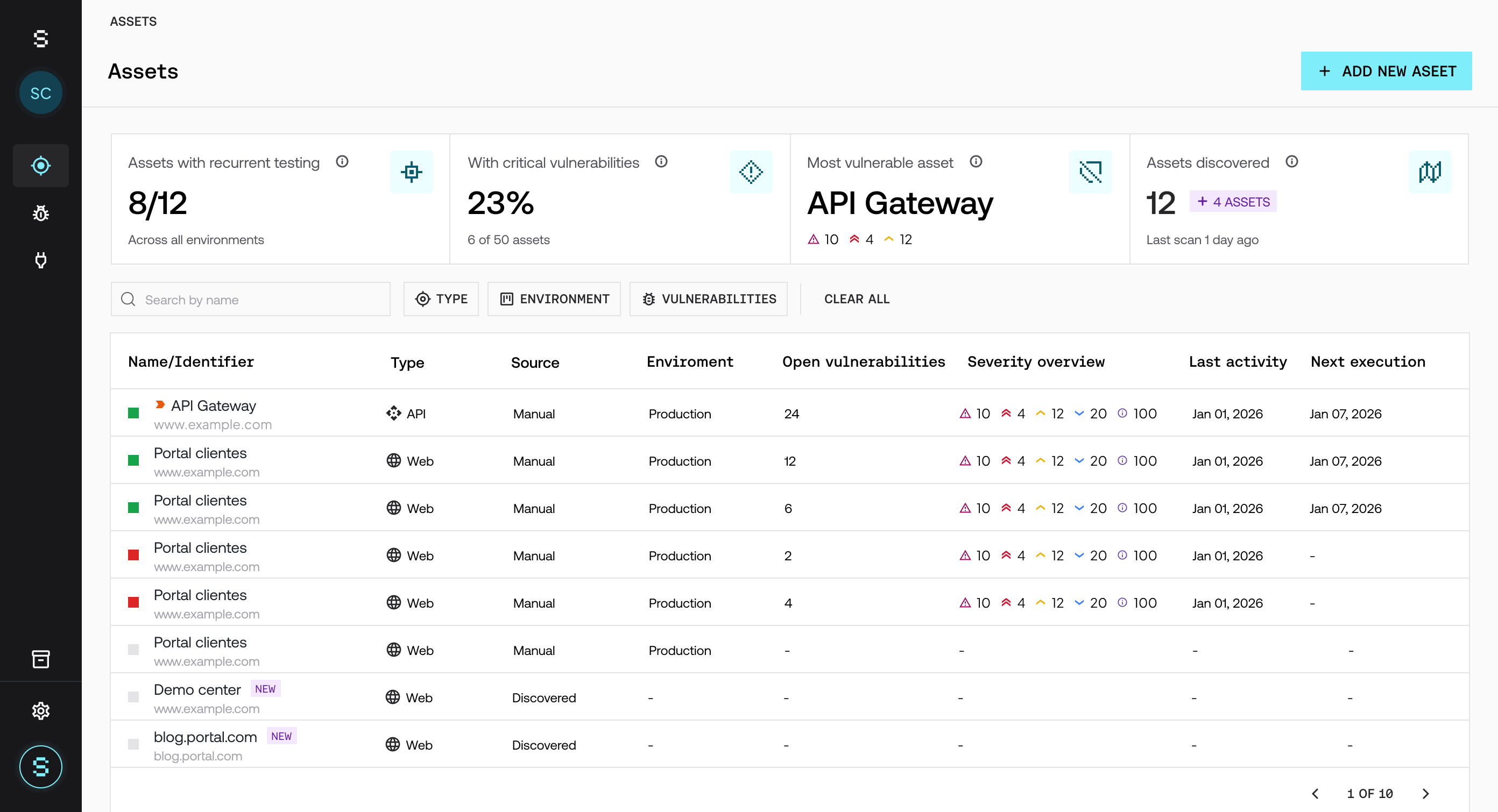
The main table lets you view and manage all your assets. For each one, it shows:
Name/Identifier: name and URL of the asset.
Type: asset type.
Source: origin of the asset (manual or discovery).
Environment: environment where it is deployed (Development, Staging, or Production).
Open vulnerabilities: number of open vulnerabilities.
Severity overview: open vulnerabilities by severity.
Last activity: date of the last activity on the asset.
Next scheduled test: date of the next scheduled run.
The color indicator on the left of each row shows the asset status. You can search by name and filter by Type, Environment, and Vulnerability.
Asset statuses
The status indicates whether the asset is being tested, based on the Threat Emulations that include it:
Color | Status | What it means |
|---|---|---|
Green | Active (recurrence on) | The asset is included in at least one Threat Emulation with active recurrence. |
Red | Active (recurrence off) | The asset is included in Threat Emulations, but none of them has active recurrence. |
Gray | Inactive | The asset is not included in any active Threat Emulation, so it is not being tested. |
Discovered assets
Assets with discovery as their origin were automatically identified by the Live Asset Radar and appear as new in the platform. For these assets, you can:
Complete their configuration and include them in a Threat Emulation to test them.
Keep them under monitoring.
Hide them if they are not relevant.
Including them in a Threat Emulation lets you expand testing coverage and reduce blind spots in your attack surface.
How to test a discovered asset
Open the asset detail and check that it is an asset of your organization.
Complete its configuration, for example the Description, the credentials, and the technical documentation. For more details, see How to add a new asset.
Include it in a Threat Emulation: click Start test from the asset detail, or select it with Browse inventory in the Scoping step when creating a Threat Emulation. For more details, see How to create a Threat Emulation.
Frequently asked questions
What is a discovered asset?
It is an asset that Strike automatically detected with the Live Asset Radar. To test it, complete its configuration and include it in a Threat Emulation.
Does registering an asset start testing?
No. An asset is tested when you include it in a Threat Emulation. Registering or configuring an asset does not consume credits.
Why does my asset appear in red?
Because it is included in Threat Emulations, but none of them has active recurrence. If you want it to be tested on a recurring basis, turn on recurrence in the Threat Emulation or include the asset in a recurring Threat Emulation.
Can an asset be in more than one Threat Emulation?
Yes. You can include the same asset in several Threat Emulations. To see how its configuration is shared, see How configuration is inherited between an asset and a Threat Emulation.
Can I hide discovered assets that are not relevant?
Yes. In the assets table, hover over the asset row and click the hide icon. This way you keep only the relevant assets visible and reduce noise in management.