Language settings for the platform and reports
Last updated: October 20, 2026
Strike is available in English, Spanish and Portuguese, both on the platform and in reports, so each team can work in the language that is most comfortable for them. This article explains what you can configure and where.
Available languages
English
Spanish
Portuguese
All three languages apply equally to the platform interface and to the reports you download from it.
How to change the platform language
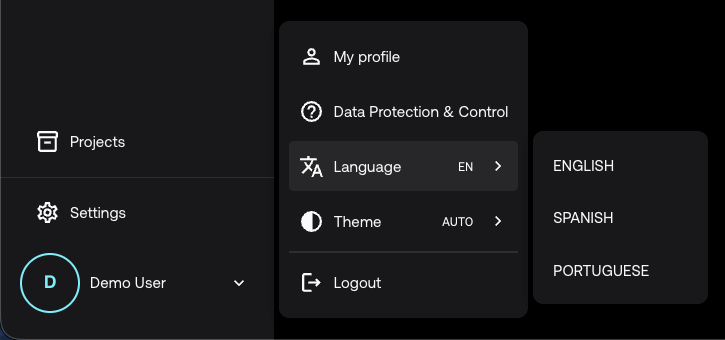
The platform language is set in your user profile. The change only affects your account, not other team members' accounts.
Go to your profile.
Open the Language section.
Select the language you want to use.
The interface updates automatically to the selected language.
Report's language
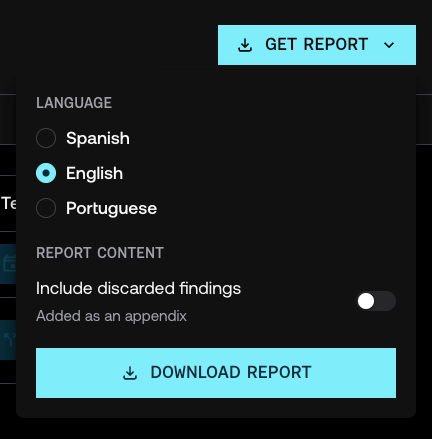
The report language is chosen when you generate it, independently of the platform language. This way you can, for example, work on the platform in Spanish and download a report in English to share it with another team.
Click Get report.
In the dropdown, select the report language.
Generate the report.
For more details about reports, see How to generate and download a report.
Frequently asked questions
If I change my language, does it affect the rest of my team?
No. The platform language is an individual preference for each user.
Can I generate reports in a language different from my platform language?
Yes. The report language is chosen when you generate it, regardless of the language you have set on the platform.