Statuses of a Threat Emulation and its executions
Last updated: October 15, 2026
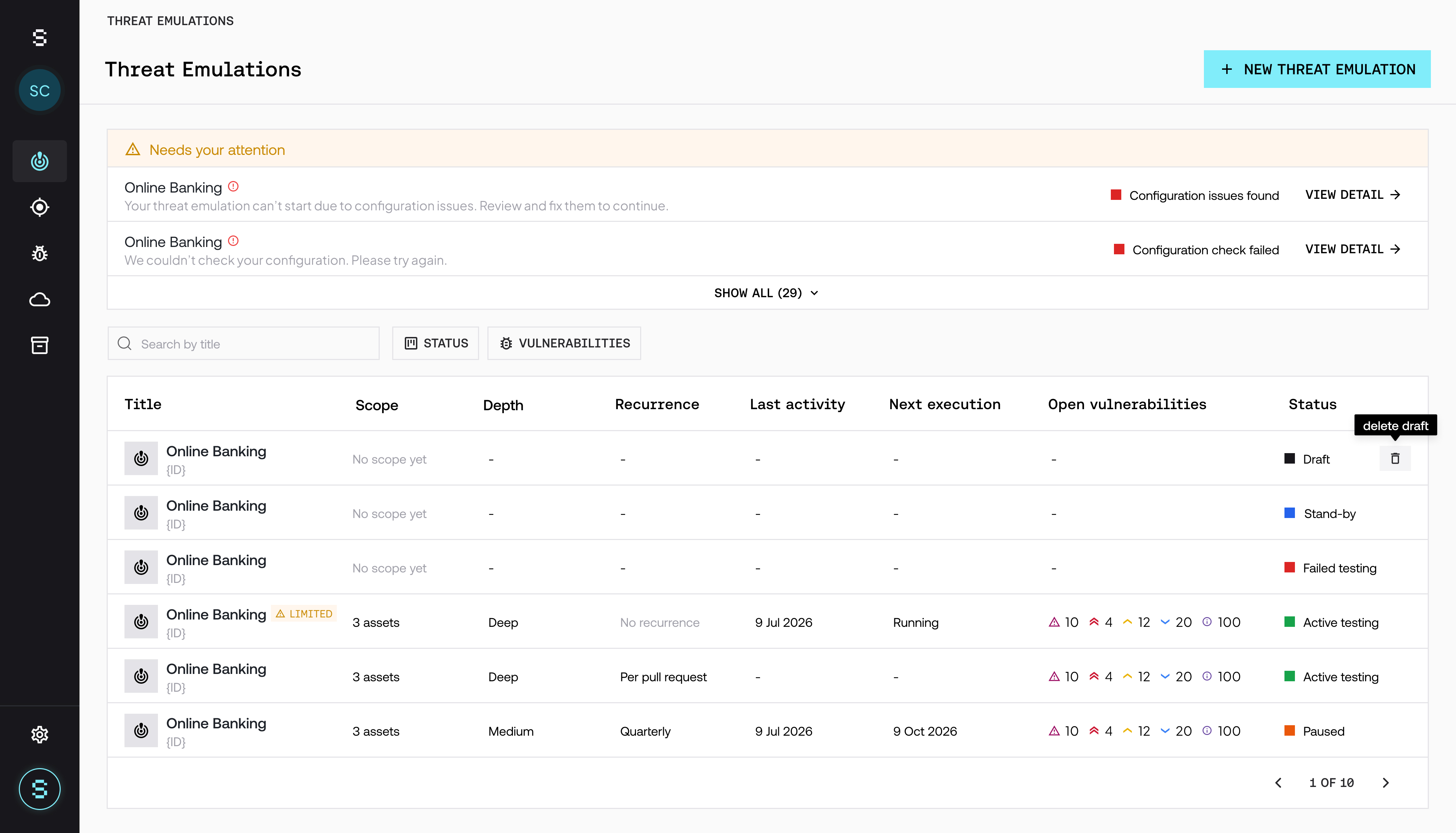
Each Threat Emulation has a status that indicates where it is and which actions you can take. You can see it in the Status column of the Threat Emulations list and next to the title in the detail view.
In addition, each execution has its own status, which you can see in the Executions tab of the detail view.
Threat Emulation statuses
Status | What it means |
|---|---|
Draft | The Threat Emulation was created but has not been confirmed yet. It has not run and has not consumed credits. |
Stand-by | The Threat Emulation is active and waiting for its next scheduled execution. It also stays in this status if a schedule restriction does not allow testing at that moment: it runs in the next allowed window. |
Active testing | An execution is in progress. |
Paused | The Threat Emulation is paused and does not run until you resume it. It can be paused manually or automatically if your plan does not have enough credits for the next execution. |
Failed testing | The execution failed. This can happen if the Pre-flight Check fails at the start of the execution or, less frequently, because of an error on Strike's side. In these cases, the Strike team retries the execution. |
Available actions by status
Action | When it is available |
|---|---|
Pause | In any status, unless the Threat Emulation is already paused. |
Resume | Only if the Threat Emulation is paused. |
Cancel execution | Only while an execution is in progress. |
Edit | Not available while an execution is in progress. |
Delete | Only in Draft status. A Threat Emulation that has already had executions cannot be deleted. |
For more detail on pausing and canceling, see How to pause a Threat Emulation or cancel an execution.
Delete a Threat Emulation in Draft
In the Threat Emulations list, hover over the row of the Threat Emulation in Draft.
Click the delete icon.
Confirm with Delete draft.
Since a draft never ran, no results are lost. The action deletes the draft and its scope configuration, and it cannot be undone.
Execution statuses
Status | What it means |
|---|---|
Verifying configuration | Strike is verifying the configuration with the Pre-flight Check. There are no execution details yet. |
Configuration blocked | A configuration issue prevents the execution from starting. Review the configuration notice to resolve it. |
In progress | The execution is in progress. It includes the validation of findings before they are reported. |
Completed | The execution finished. |
Failed | The execution could not be completed. |
Cancelled | The execution was canceled with Cancel execution. |
Configuration notices
Before each execution, Strike verifies that it can access the assets in scope. If it finds a problem, the Threat Emulation appears in the Needs your attention block, above the list. Click View detail to see what happened. Issues are shown grouped by asset, with the ones that block testing first.
Notice | What it means | What to do |
|---|---|---|
Configuration issues found | The Threat Emulation cannot start because of configuration issues, for example an asset that does not respond or a blocked Strike IP. | Follow the recommendations for each issue, resolve it, and click Retry. |
Configuration check failed | Something failed while verifying the configuration. You do not need to change anything. | Wait a few minutes and click Retry. |
Limited | The Threat Emulation runs, but something may limit coverage, for example a WAF or a rate limit. | Follow the recommendations to get complete results. Testing continues even if you make no changes. |
To avoid the most common issues, see How to allowlist Strike's IPs.
Frequently asked questions
Why is my Threat Emulation in Paused if I did not pause it?
Because your plan does not have enough credits for the next execution. Contact your CSM to add credits and then resume it with Resume.
Why is my Threat Emulation in Stand-by if it should be running?
There may be an active schedule restriction. The execution starts in the next allowed window. You can review your restrictions in the Configuration tab.
My Threat Emulation is in Failed testing. Do I need to do anything?
No. The Strike team retries the execution. If the problem is a configuration issue, you will see a notice in Needs your attention with the steps to resolve it.
Can I delete a Threat Emulation that has already run?
No. You can only delete Threat Emulations in Draft status. If you do not want it to keep running, you can pause it.