How to set up Change-Based Testing on an asset
Last updated: July 7, 2026
Change-Based Testing automatically detects code changes in the repositories linked to an asset and triggers an execution focused on those changes. It helps you close the gap that opens between how your asset evolves and when it gets validated, including cases like shortening the time between a deploy and its testing, or ensuring no relevant change goes unreviewed until the next recurrent cycle.
⚠ Availability: Change-Based Testing is an add-on. To have it available, you need to purchase a testing units bundle (also called one-off executions), which is the same bundle used for Focused Tests. If you don't have the add-on, you won't see the integration flow in the asset configuration. To enable it, contact your Customer Success Manager.
What Change-Based Testing is
Until now, security validation on an asset in Strike worked through threat emulations: continuous, automatic, and recurrent executions that draw from the asset context.
The asset context is the foundation on which all validation runs. But the asset evolves constantly: every deploy, every PR, every release introduces changes that may go unvalidated until the next recurrent cycle. That gap between how your asset changes and when it gets tested can translate into new vulnerabilities or new areas that go weeks without review.
To close that gap, we created Change-Based Tests: automatic executions triggered when there are changes in the repositories linked to the asset, focused on those changes. Strike detects what changed and validates that delta without you having to step in, complementing the recurrent cycle with targeted validations at the exact moment changes appear.
Automatic: triggered on its own, you don't need to request it every time.
Change-scoped: the test focuses on the PRs or releases that generated the event.
Configurable: you decide when it triggers — per PR, per release, or grouped once a week.
Independent: doesn't affect or pause the recurrent threat emulations cycle.
How it works
When you set up Change-Based Testing on an asset, Strike installs a GitHub App that listens for events on the linked repositories. Every time the trigger you chose fires, Strike runs a threat emulation focused on the included changes.
The result is an execution focused on the narrowed scope of what changed. Vulnerabilities are linked to the PRs that introduced them, so you know exactly which change generated them and you can close the gap between deploy and validation.
ℹ Strike doesn't access the content of your code. The GitHub App has read-only permissions over metadata: PR title, author, date, modified files. It cannot read, modify, or download the code in your repositories.
Trigger options
You have three ways to configure when the execution triggers, depending on your team's workflow:
Option | When it triggers | Consumption |
|---|---|---|
Per pull request | Every time a PR is merged to the main branch. | 1 execution per merged PR. |
Per release | Every time a new release is published. | 1 execution per published release. |
Change-Based Tests vs. threat emulations
Both types of execution use the same AI Pentester engine and the same asset configuration, but they have different lifecycles and purposes. Threat emulations run continuous validation on a fixed schedule, while Change-Based Testing reacts to code events to shorten the window between deploy and validation.
Attribute | Threat emulations | Change-Based Tests |
|---|---|---|
Trigger | Automatic (schedule) | Automatic (GitHub events) |
Frequency | Recurrent, continuous | One execution per event (or per weekly batch) |
Scope | Driven by asset context | Focused on code changes |
Depth | Complete and deep analysis | Focused, optimized validation |
Purpose | Continuous validation | Close the window between deploy and testing |
Engine | AI Pentester | AI Pentester |
Asset configuration | Same | Same |
Consumption bundle | Base recurrence plan | Testing units bundle (shared with Focused Tests) |
When to use each one
Threat emulations are your continuous validation layer: keep them active to maintain permanent visibility over the asset's risk.
Change-Based Testing is your tool to shorten the exposure window: use it when you have frequent deploys and want every relevant change to be validated close to the moment it's introduced.
It's not one or the other. Change-Based Tests complement recurrent threat emulations, they don't replace them. The ideal setup is to have both active: complete periodic coverage, plus a quick validation on every change.
How to set up Change-Based Testing
Before you start
Have the add-on contracted and testing units available in your account.
Have an Owner or Operator role in the Strike organization.
Have admin access to the GitHub organization where your code lives.
Step 1: Go to the asset configuration
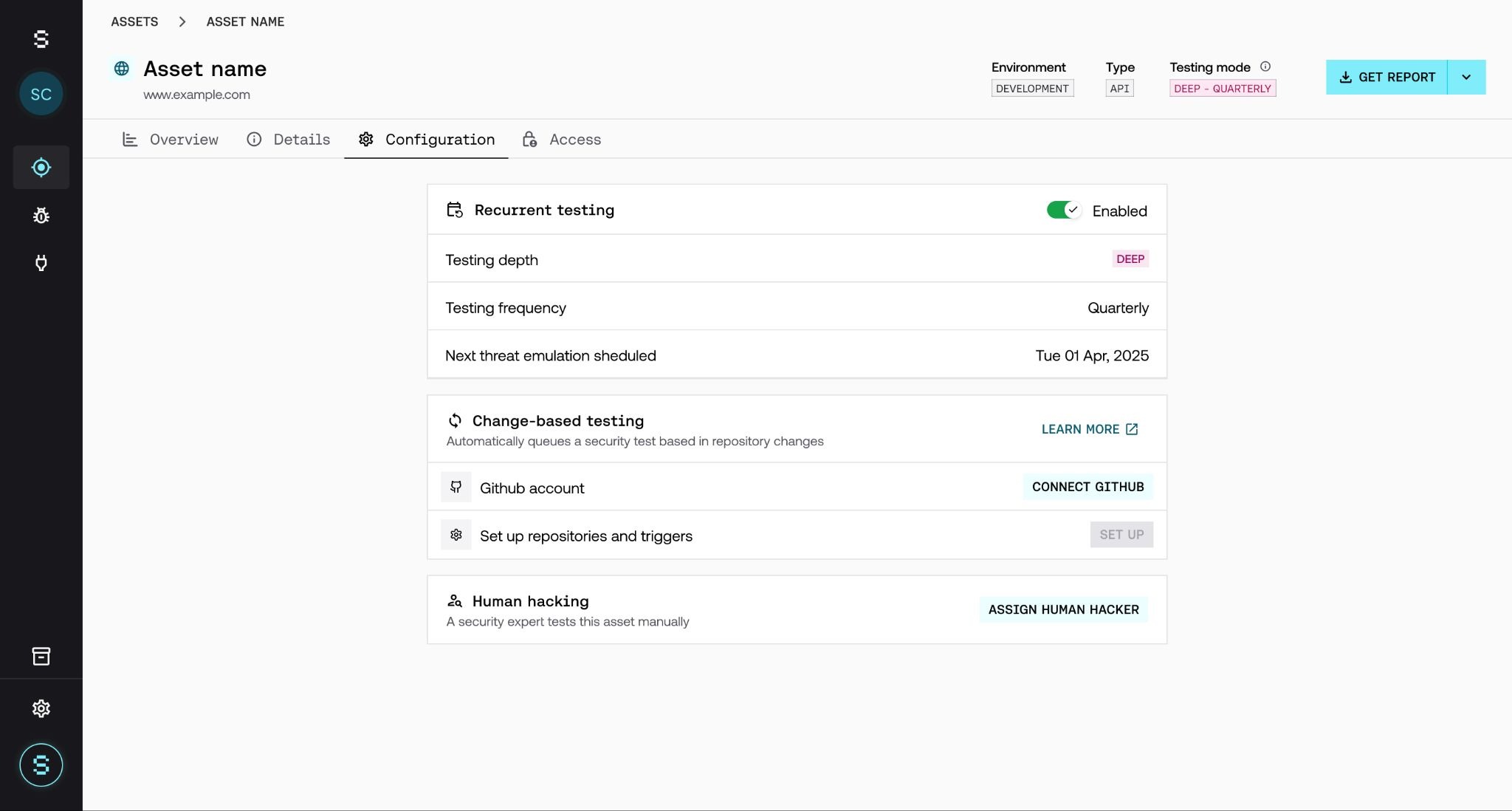
From the assets list, select the asset you want to enable the feature on. Inside the asset, in the Configuration tab, find the Change-based testing section. If you haven't enabled it on any other asset yet, you'll see the Connect GitHub button.
Step 2: Connect GitHub
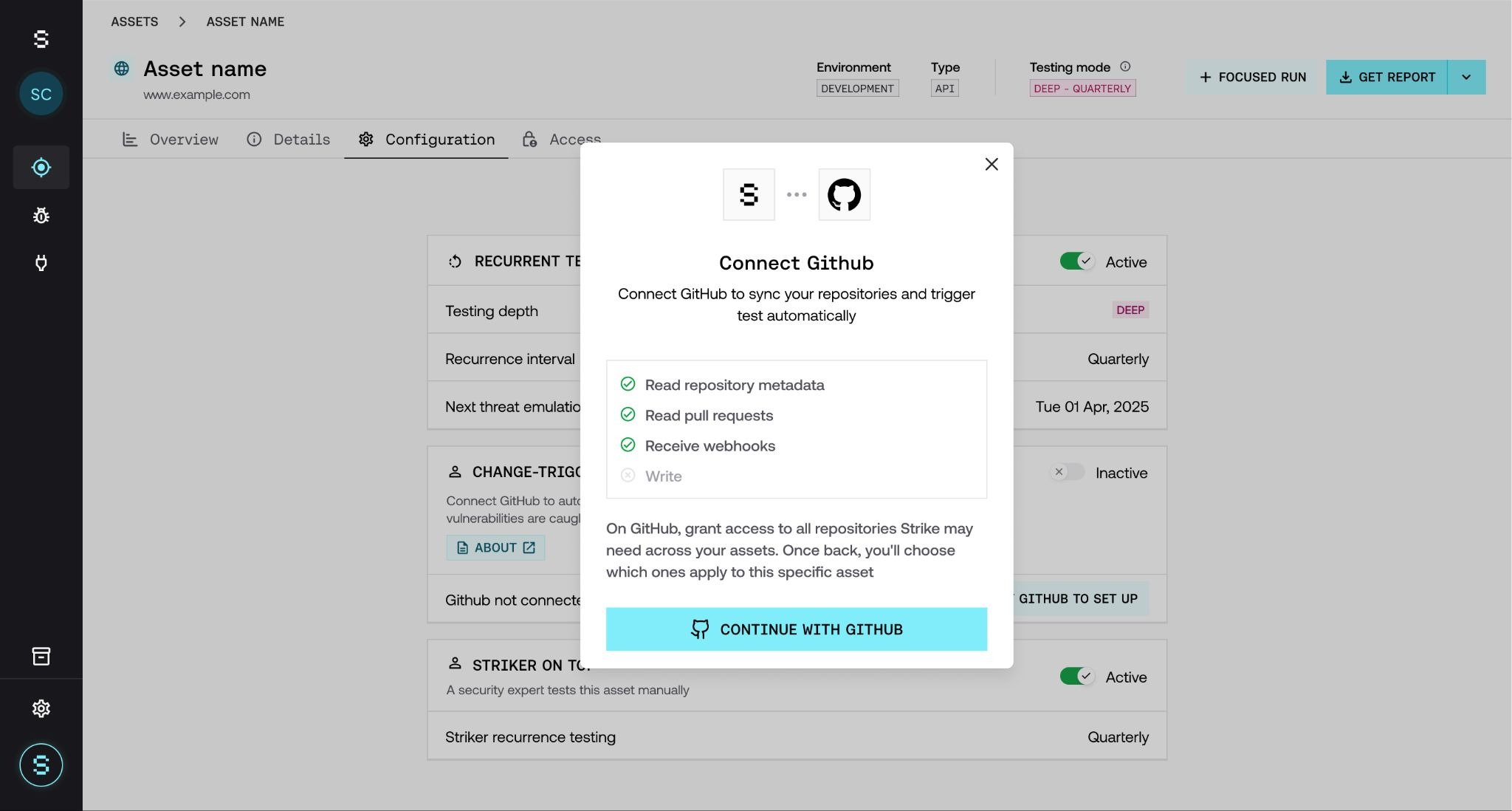
Click Connect GitHub. A new GitHub tab opens where you need to:
Select the organization where Strike's GitHub App will be installed.
Select the repositories Strike will have access to (can be all of them or a specific subset for an asset).
Confirm the installation. GitHub automatically redirects you back to the asset in Strike.
ℹ Once per organization. The GitHub App installation is done once per GitHub organization. If later you want to enable Change-Based Testing on other assets pointing to the same organization, Step 2 will already be marked as ✓ Connected and you'll skip directly to Step 3.
Step 3: Link repositories and choose trigger
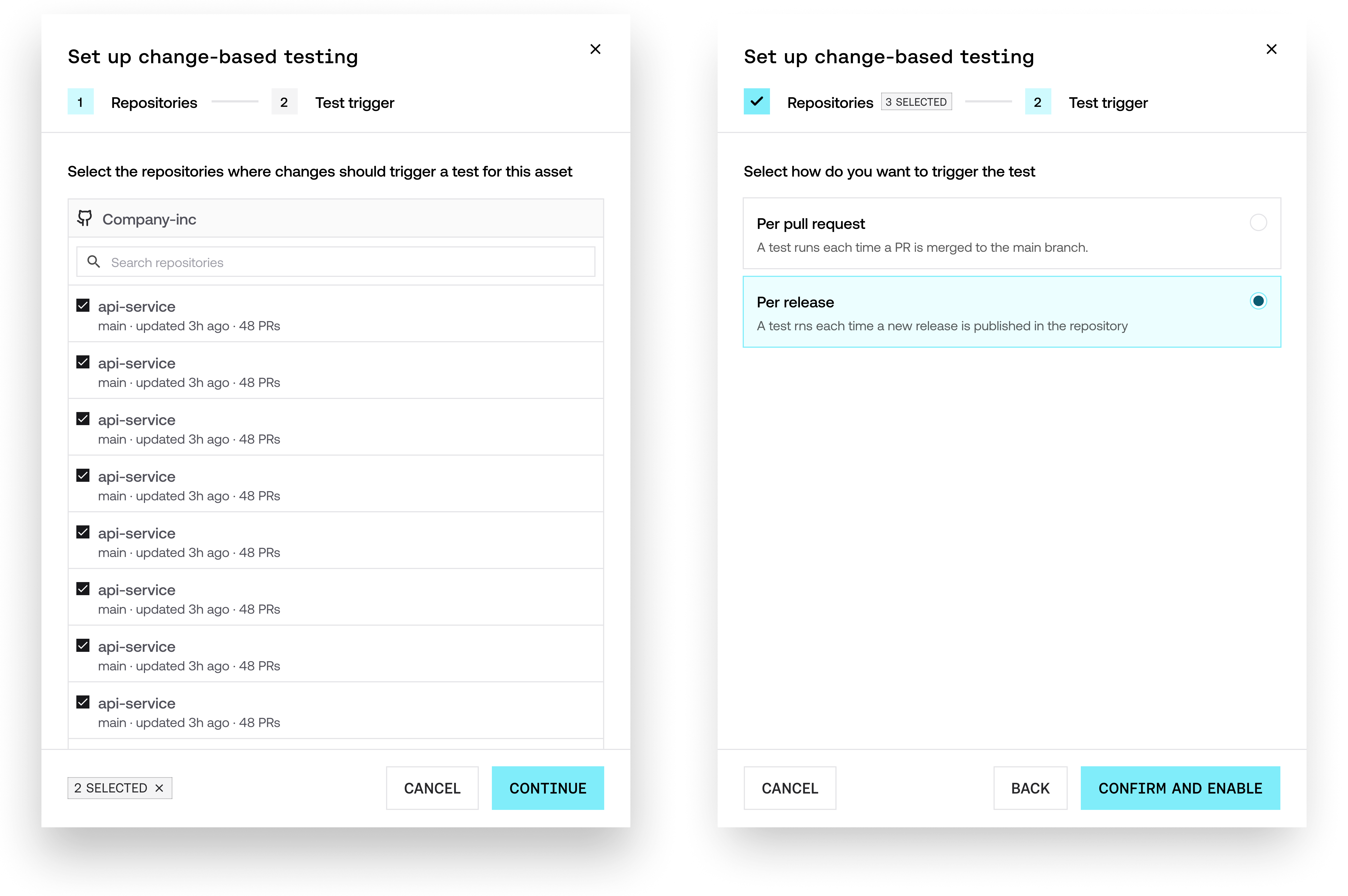
Once the GitHub App is connected, the Set Up button is enabled below. Here you'll define:
Repositories: select the repositories that correspond to this asset. You can link more than one if your asset depends on multiple repos.
Test trigger: choose between Per pull request, Per release.
Click Confirm and Enable and that's it: the asset is now listening for changes.
Step 4: Verify it's working
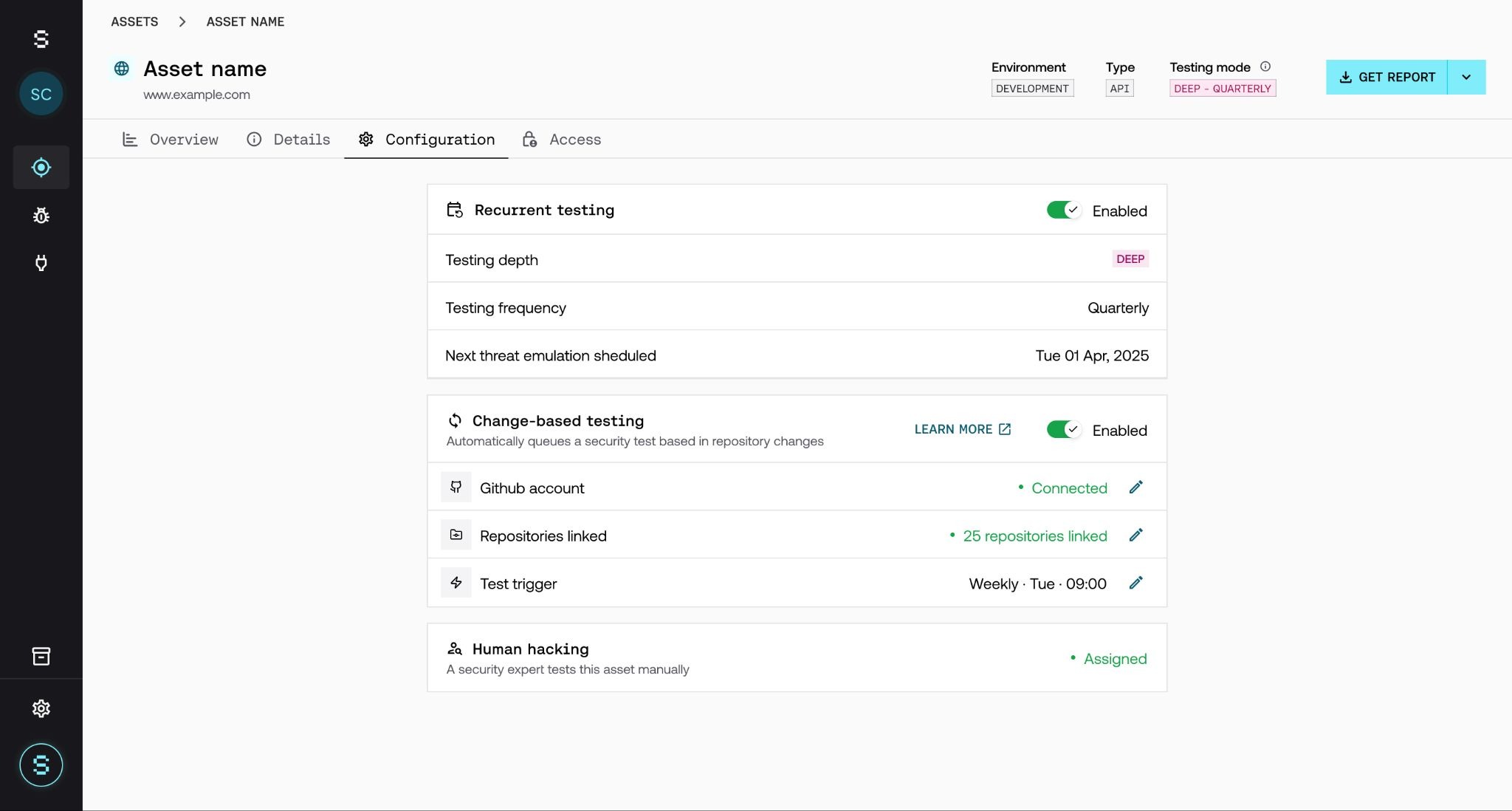
When the asset reaches the Enabled state, you'll see:
In the assets list: a green 🔄 icon indicating Listening for changes in repositories.
In the asset overview: a section showing the active feature info (available executions, PR batch counter, linked repositories, etc.).
Clicking on the section reveals the detail of each pending PR: title, author, date, lines changed, and next estimated execution.
Step 5: Review the results
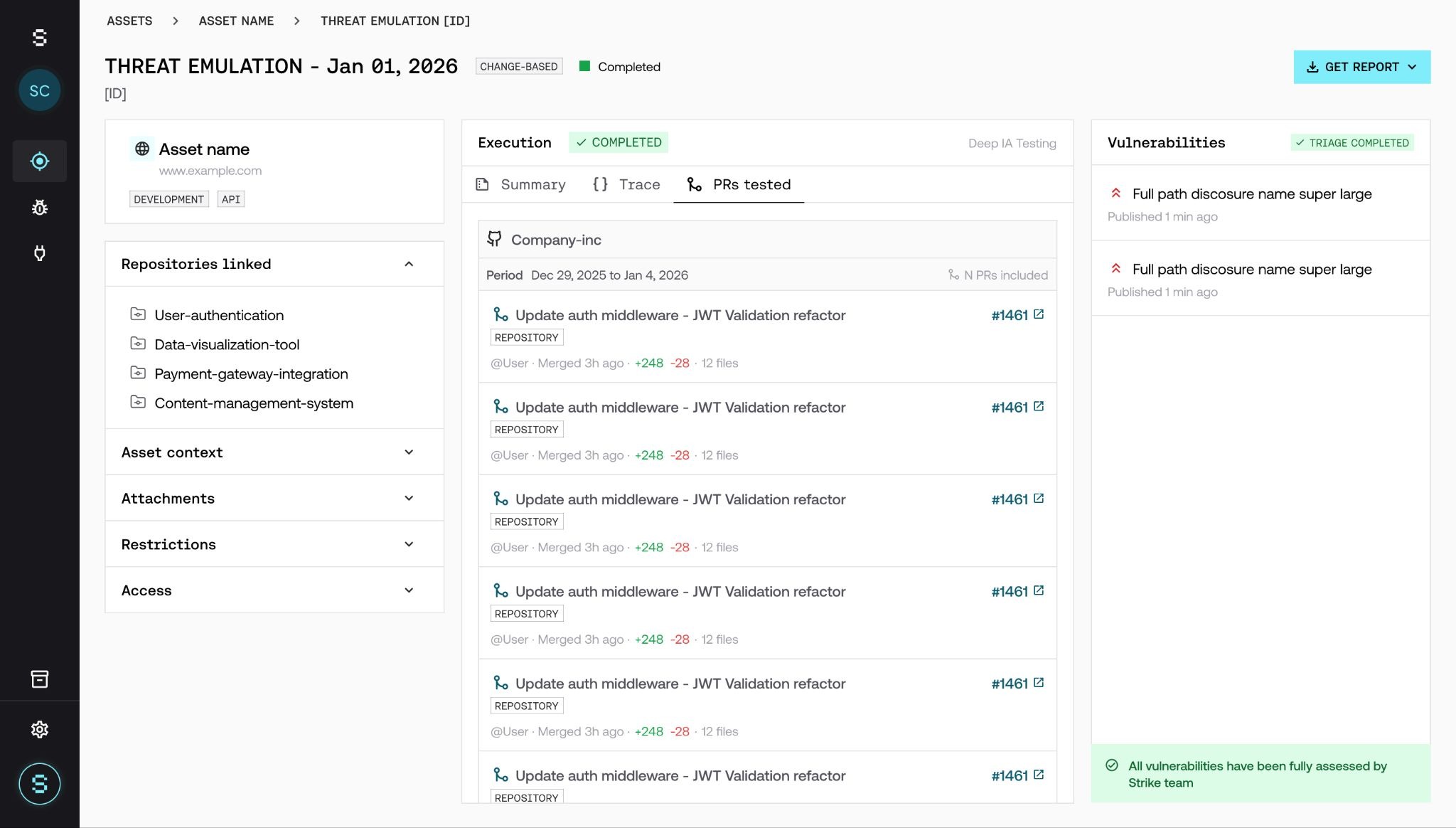
Change-based executions appear in the threat emulations table, identified with a Change-Based tag. Click on an execution to see the detail:
Execution summary (duration, scope, linked repos).
PRs tested tab with the full list of included PRs, each with title, author, lines changed, and direct link to GitHub.
Findings (vulnerabilities, evidence, and severity), linked to the context of the specific changes that introduced them.
ℹ Change-based executions go through triage by the Strike team, just like any other threat emulation. The findings you see are already validated.
Feature states per asset
State | Indicator | What it means |
|---|---|---|
Disabled | No icon / Gray | The feature is not configured on this asset. |
Enabled | Green + Enabled | Active, listening for changes on the linked repos. |
Paused | Red + Paused | No testing units available. Changes are detected but no tests are triggered. |
Plan and consumption
Change-Based Testing is an add-on contracted on top of the base plan. Three concepts to understand how it's billed:
Add-on: sold as a separate complement to your asset's base recurrence. Your recurrent testing keeps working as usual; this feature adds coverage, it doesn't replace it.
Per-asset activation: each asset can have the feature active or not. The GitHub integration is done once at the organization level; on each asset you only link the relevant repos.
Shared bundle: each execution consumes 1 testing unit from the one-off executions bundle. That bundle is shared with Focused Tests, so consumption is deducted from the same pool.
You can see your bundle's available balance on the Plan & Usage page of your organization. To add more executions or adjust your plan, contact your Customer Success Manager.
Frequently asked questions
Do I need to involve the development team to set this up?
Not necessarily. If you have admin access to the GitHub organization, you can complete the entire setup yourself. It takes less than 10 minutes.
Can Strike see or modify my code?
No. The GitHub App has read-only permissions over PR metadata (title, author, date, modified files). It doesn't access the code content or interfere with your CI/CD pipeline.
Can I link several repositories to the same asset?
Yes. An asset can have multiple linked repos; PRs from all of them are monitored and included in the batches.
Can a repository be linked to several assets?
Yes. If a repo affects multiple assets, link it to each one. A PR in that repo triggers tests on all linked assets.
How do I know which PR introduced a vulnerability?
In the threat emulation detail, the PRs tested tab shows all included PRs. Vulnerabilities are kept in the context of those specific changes.
Do change-based vulnerabilities go through triage by the Strike team?
Yes. Just like any other threat emulation, the Strike team reviews and validates the findings before displaying them as confirmed.
How are Change-Based Testing executions consumed?
Each execution consumes 1 testing unit from the one-off executions bundle associated with your account. This bundle is shared with Focused Tests, so consumption is deducted from the same pool. You can see the available balance on the Plan & Usage page of your organization.
What happens if a scheduled execution and a change-based one fall on the same day?
Both run in parallel. The recurrent one consumes from the base recurrence plan; the change-based one consumes from the testing units bundle. There's no automatic deduplication: they're two tests with different purposes.
What happens if I unlink a repository?
The repo stops being monitored and any pending PRs from that repo are removed from the batch. The history of previous executions remains visible and the associated findings stay available on the asset.
What happens if the GitHub App is uninstalled from GitHub?
All assets that depended on that organization lose the connection and go to Disabled state. To reactivate the feature you need to reinstall the app and reconfigure the repo links.
What happens if I run out of testing units?
The feature goes to Paused state. PRs are still detected and accumulated, but tests are not triggered until you renew or expand the bundle. Recurrent threat emulations are not affected; they keep running with the base plan. When new units are added, the feature reactivates automatically. To add more executions, contact your Customer Success Manager.
Does it only integrate with GitHub? Is there support for GitLab, Jenkins, or others?
For now the available integration is with GitHub. We're adding support for other platforms (GitLab, Jenkins, etc.) incrementally, based on customer needs. If you use another tool and you're interested in this feature, contact your Customer Success Manager so we can add your case to the prioritization.